Overview
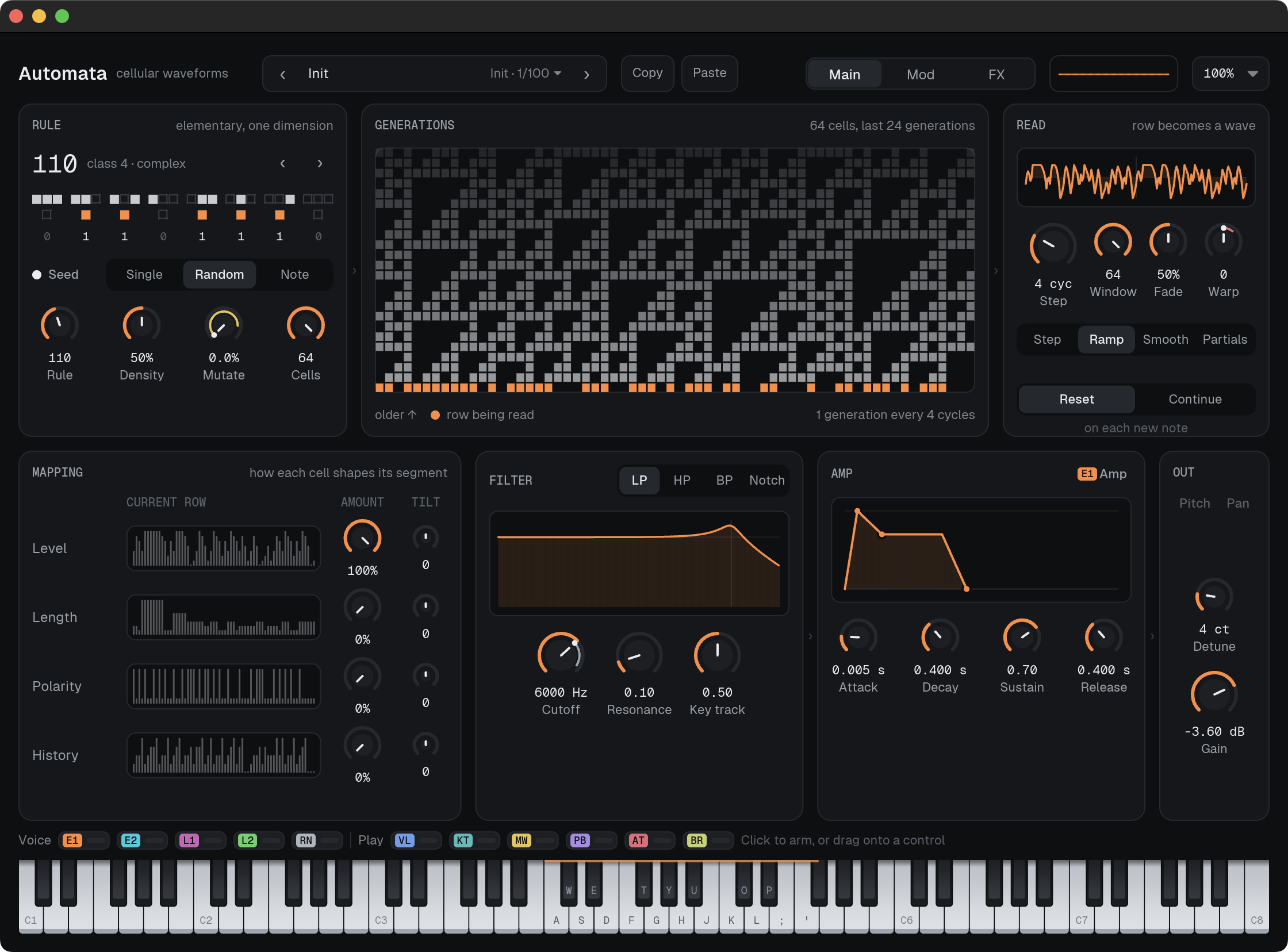
Automata turns cellular automata into sound. Each voice runs a small ring of on/off cells, and one of Wolfram's 256 elementary rules decides how each row becomes the next. Automata reads the current row as one cycle of a waveform, so every new generation changes the timbre while the keyboard keeps the pitch.
The rule you pick sets the character. Simple rules give steady, buzzy tones. Periodic rules loop and pulse. Chaotic ones give you noise with a pitch. The complex rules, like 110 and 54, send little structures crawling across the wave until they collide, and that's where it gets interesting.
You don't need to know any of the maths to use it. Click a rule tile to flip one bit and hear the neighbouring rule, turn Step to decide how fast things evolve, and watch the generations scroll past while you play. Nothing is playing? The display still runs the rule from middle C, so you can see what a rule does before you hear it.
Credits
Automata stands on a lot of other people's work:
- Jacques Chareyron, "Digital Synthesis of Self-Modifying Waveforms by Means of Linear Automata", Computer Music Journal 14(4), 1990. The core idea of reading an automaton's state as one period of a waveform.
- Nikolas Valsamakis, "Non-Standard Sound Synthesis with Dynamic Models", PhD thesis, University of Plymouth, 2013. Dynamic Waveform Segment Synthesis, the model for how each cell shapes its segment. Link
- Eduardo Reck Miranda, "Granular Synthesis of Sounds by Means of a Cellular Automaton", Leonardo 28(4), 1995 (Chaosynth).
- Stephen Wolfram, "Statistical Mechanics of Cellular Automata", Reviews of Modern Physics 55(3), 1983, and "Universality and Complexity in Cellular Automata", Physica D 10, 1984. The rule numbering and the four classes.
- Matthew Cook, "Universality in Elementary Cellular Automata", Complex Systems 15(1), 2004. Why rule 110 is the default.
- Iannis Xenakis, Formalized Music, Pendragon Press, 1992, and Herbert Brün's SAWDUST. The wider family of waveforms built from small segments.
- Casio's CZ series, for the phase distortion behind Warp.
Features
- All 256 elementary rules, labelled by class (uniform, periodic, chaotic, complex). Click the rule tiles to flip bits and jump to nearby rules.
- Three seeds: a single centre cell, a random row, or a row picked by the key you play, so each key always starts the same way.
- Four ways to read a row: Step, Ramp and Smooth turn cells into wave segments; Partials turns each cell into a harmonic, like an organ whose drawbars the rule pulls. Partials never aliases.
- Step from 1 to 512 cycles per generation, from buzzing grit at 1 to slow-drifting pads at a few hundred. Crossfade between generations with Fade.
- CZ-style Warp phase distortion for filter-like sweeps without a filter.
- Mapping rows (Level, Length, Polarity, History) decide how each cell shapes its segment, each with a Tilt that moves it over the life of a generation.
- Mutate flips random cells to keep frozen rules alive, or to push any rule into noise.
- Per-voice multimode filter (LP, HP, BP, Notch) with key tracking.
- 8-slot mod matrix with two envelopes, two tempo-syncable LFOs with delay, velocity, key track, mod wheel, pitch bend, aftertouch and random. Drag a source onto any knob to route it.
- Distortion, chorus, delay and reverb on the master bus.
- 100 factory presets across bass, leads, keys, plucks, bells, percussion, strings, brass, vocals, pads, drones and FX, all level-matched.
- Copy and paste whole patches as text.
Changelog
Releases
-
First release of Automata, which turns cellular automata into waveforms: each generation of cells becomes the next cycle of the sound.
Effects rack
- Filter, distortion, chorus, flanger, delay, reverb and a five-band EQ, each with its own On switch and Mix in the chain list.
- Drag effects to reorder the chain; click one to edit it.
- Delay, chorus and flanger rates can sync to the host tempo.
- Drag the EQ curve's nodes to shape it.
Modulation
- Click a source to arm it, then drag any knob to set its amount, or click a knob to add or remove the source.
- Knobs show a live dot where modulation puts them.
- Routings support a via source (for example mod wheel × LFO), polarity flip and bypass.
- The effects can be modulated too.
- Mod wheel, aftertouch, breath (CC 2) and expression (CC 11) are supported.
- Vel Sens and Vel Curve set how hard you need to play.
Presets
- Every preset comes with routings for velocity, the mod wheel and aftertouch.
- Search by name, type or character tag.
- Browse with the arrow keys; Esc returns to the sound you started from.
Dynamics
- Velocity now sets each note's level.